I'm developing an app that will generate / layout rich text in a canvas. So far my focus has been on the browser but now I need to do some automated testing for which I use node. But node doesn't provide text support out-of-the-box so we have to use node-canvas. How to work with text in node-canvas?
TLDR: No external code to link in the post, see below for the takeaway.
Introduction
Node-canvas is the go-to 2D canvas emulator for use server-side with nodejs. What? Ok - so I'm working on a project to put text on the HTML5 canvas which is fine when working in the browser, but since there's no built-in parallel to an HTML page or DOM in node, and therefore no HTML5 canvas element, we need to use something else.
Node-canvas has been around for a while, is stable, and there are documents and resources both on its GitHub page and in StackOverflow. Konva uses node-canvas in the nodejs environment.
And node-canvas uses fontKit which is a similarly robust and log-lived font engine for Node and the browser which is also used by PDFKit which is itself very popular. I figure that if fontKit can carry the font handling for PDFKit then it's good enough for me.
Example code
In the code below we import the required modules for Canvas and Konva. We then set up a stage with a layer and a text shape, showing some text in Arial with bold & italic applied.
Note, in case you are expecting require statements, that I use Vite.js which lets us use ES6 module code and avoid delays in transpiling TS to JS etc.
import { registerFont, Canvas } from "canvas";
import Konva from 'konva';

const stage = new Konva.Stage({
            //   container: '',  // !note - no container needed for node!
            container: null,
            width: 1200,
            height: 400
            }),

      layer = new Konva.Layer(),

      text1 = new Konva.Text({
                x: 50,
                y: 50,
                width: 600,
                height: 200,
                fontFamily: 'Arial',
                fontSize: 20,
                fill: 'black',
                text: 'Mary had a little lamb',
                visible: true
            }),

        text2 = text1.clone({y: 80, fontStyle:  'italic'}),

        text3 = text1.clone({y: 110, fontStyle:  'italic bold'})

stage.add(layer)
layer.add(text1, text2, text3)

// Grab a snapshot from the stage
const area = {width: 400, height: 300}
let imgData = stage.toDataURL(area)

// remove the URL prefix in the data
imgData = imgData!.replace(/^data:image\/png;base64,/, "")

// make a buffer from the data, courtesy of node
const buffer = Buffer.from(imgData, "base64");

// Save the data
const random = Math.random().toString(36).substring(2, 15) + Math.random().toString(23).substring(2, 5),
      filePath = filePath + "/konva_snapshot + "_" + random + ".png";

// Save the data via node file system object
fs.writeFileSync(filePath, buffer);
Having done that we grab a screenshot, convert that to a form we can save and save the file. What we get when we open it is:
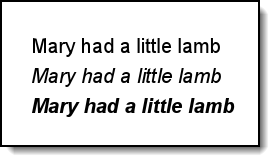
Note that in this demo we are using a font that is loaded into the system - a so-called system font. In Windows, which I am using, that means its in the c:/windows/fonts folder and it has been through the font install process. You should be able to use any TTF or OTF font that you have installed - I experimented with a few others and all seemed well, just ensure that there are corresponding font files matching the font decorations (italic & bold) that you use.
The documentation for node-canvas says that you can locate fonts elsewhere then load them via their URL or path, using the registerFont method. These are known as custom fonts. However, in my research I observed a relatively recent GitHub issue (reported Aug 2022, still open May 2024) that seemed to indicate there may be problems in this feature.
Bonus - CSS font shorthand parsing
As with many NPM packages, it took me a few attempts to get this working satisfactorily. Mainly I was having trouble understanding how to specify a font to node-canvas. I know that Konva is doing that for me, but prior to adding the Konva text shape into the mix, I was attempting text output straight to the canvas.
So, I saw mention that in the node-canvas docs that the font assignment is based on the CSS font shorthand. The project I am bringing this into already produces a fully formed CSS font shorthand that looks like this:
italic normal bold 400px/1.2 Arial, sans-serif
Which was resulting in non-selection of anything Arial-like. I found that the code that node-canvas uses for font parsing expected something more like:
italic bold 400px "Arial"So, the line height hint was getting in the way. When I simplified the font description as above it started to play nice.
In case it is of use, here is the code from the node-canvas /lib/parse-font.js file which does the parsing of the font definition string.
'use strict'

/**
 * Font RegExp helpers.
 */

const weights = 'bold|bolder|lighter|[1-9]00'
const styles = 'italic|oblique'
const variants = 'small-caps'
const stretches = 'ultra-condensed|extra-condensed|condensed|semi-condensed|semi-expanded|expanded|extra-expanded|ultra-expanded'
const units = 'px|pt|pc|in|cm|mm|%|em|ex|ch|rem|q'
const string = '\'([^\']+)\'|"([^"]+)"|[\\w\\s-]+'

// [ [ <‘font-style’> || <font-variant-css21> || <‘font-weight’> || <‘font-stretch’> ]?
//    <‘font-size’> [ / <‘line-height’> ]? <‘font-family’> ]
// https://drafts.csswg.org/css-fonts-3/#font-prop
const weightRe = new RegExp(`(${weights}) +`, 'i')
const styleRe = new RegExp(`(${styles}) +`, 'i')
const variantRe = new RegExp(`(${variants}) +`, 'i')
const stretchRe = new RegExp(`(${stretches}) +`, 'i')
const sizeFamilyRe = new RegExp(
  `([\\d\\.]+)(${units}) *((?:${string})( *, *(?:${string}))*)`)

/**
 * Cache font parsing.
 */

const cache = {}

const defaultHeight = 16 // pt, common browser default

/**
 * Parse font `str`.
 *
 * @param {String} str
 * @return {Object} Parsed font. `size` is in device units. `unit` is the unit
 *   appearing in the input string.
 * @api private
 */

module.exports = str => {
  // Cached
  if (cache[str]) return cache[str]

  // Try for required properties first.
  const sizeFamily = sizeFamilyRe.exec(str)
  if (!sizeFamily) return // invalid

  // Default values and required properties
  const font = {
    weight: 'normal',
    style: 'normal',
    stretch: 'normal',
    variant: 'normal',
    size: parseFloat(sizeFamily[1]),
    unit: sizeFamily[2],
    family: sizeFamily[3].replace(/["']/g, '').replace(/ *, */g, ',')
  }

  // Optional, unordered properties.
  let weight, style, variant, stretch
  // Stop search at `sizeFamily.index`
  const substr = str.substring(0, sizeFamily.index)
  if ((weight = weightRe.exec(substr))) font.weight = weight[1]
  if ((style = styleRe.exec(substr))) font.style = style[1]
  if ((variant = variantRe.exec(substr))) font.variant = variant[1]
  if ((stretch = stretchRe.exec(substr))) font.stretch = stretch[1]

  // Convert to device units. (`font.unit` is the original unit)
  // TODO: ch, ex
  switch (font.unit) {
    case 'pt':
      font.size /= 0.75
      break
    case 'pc':
      font.size *= 16
      break
    case 'in':
      font.size *= 96
      break
    case 'cm':
      font.size *= 96.0 / 2.54
      break
    case 'mm':
      font.size *= 96.0 / 25.4
      break
    case '%':
      // TODO disabled because existing unit tests assume 100
      // font.size *= defaultHeight / 100 / 0.75
      break
    case 'em':
    case 'rem':
      font.size *= defaultHeight / 0.75
      break
    case 'q':
      font.size *= 96 / 25.4 / 4
      break
  }

  return (cache[str] = font)
}
Summary
We've seen how simple it is to set up Konva and nodejs, and that it's straightforward to load system fonts into the node canvas. We've also seen that we need to give node-canvas a cut-down CSS fond shorthand description, and we've got the code that node-canvas uses to parse font descriptions in case we need to see what it's doing with out font requests.
Thanks for reading.
VW May 2024