Ever need to get up to speed quickly on a new coding or scripting language? Or some other skill or knowledge? Me too. I needed to get familiar with KQL as part of familiarisation with MS Fabric. I used a few of the many tutorials and learning resources - so what to do to test my knowledge? I asked Claude to make me a practice app.
KQL is a query language for exploring, filtering, and analysing large volumes of structured, semi-structured, and unstructured data—especially logs, telemetry, and time-series data. But the concept of the practice app, or drill, works for any subject.
The Solution
I asked Claude to make a drill with sections for multi choice, flash cards, fill the missing syntax, and challenges to write the code. It has filters to select specific concepts like string and date handling. And Claude suggested the concept of the Solid, Learning, Missed and Not Seen Yet tracking process.
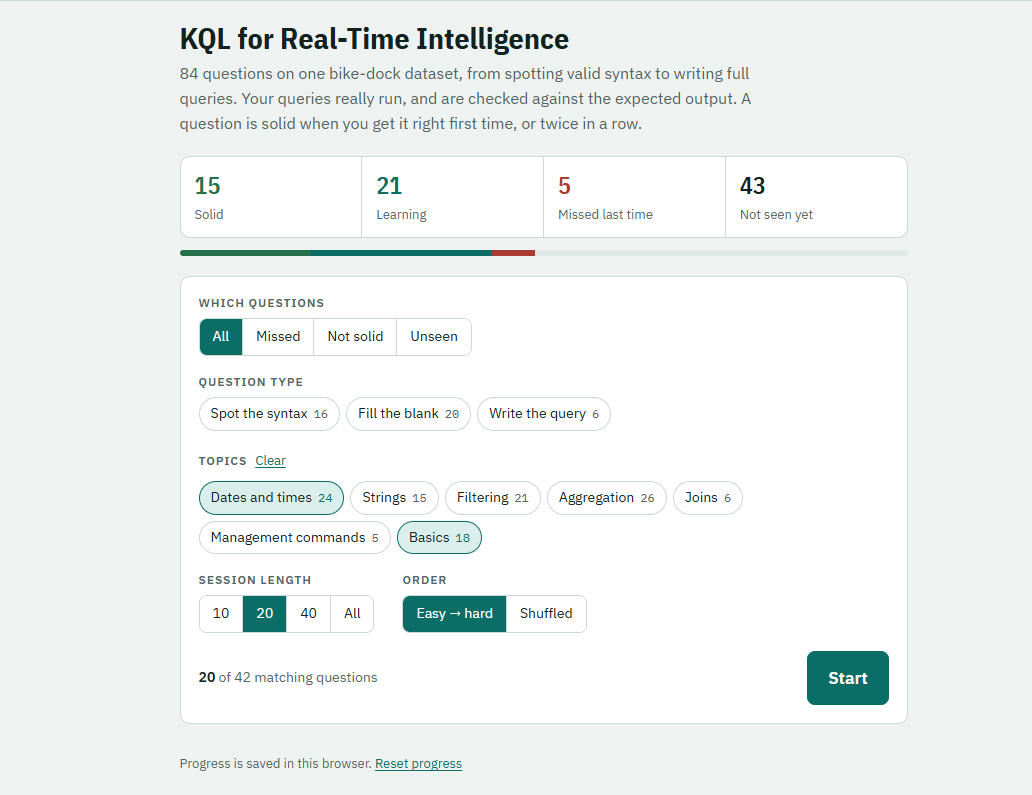
How it works : The drill is meant to be used repeatedly to bed in the material. The first 3 times you see a question it is in the Learning bucket. Get it right 3 times and it moves into the Solid bucket. Missed last time is the list of what you got wrong. And Not Seen Yet are the questions you have yet to see.
The best practice, according to people who know, is to run the test daily for a week, then once a week, then once a month. After 3 months its there for life.
I also ask it to add more questions individually when I find something in the learning docs that it overlooked. It does that without losing the stats on my tests to date.
The Prompt
If you are interested, here is the prompt the Claude made when I asked for a generic prompt to construct a drill like this.
Build me an interactive drill web page for learning [SUBJECT, e.g.
KQL / T-SQL / DAX / PySpark / regex], aimed at [GOAL, e.g. passing the X
assessment], for someone with [MY BACKGROUND, e.g. SQL Server & JavaScript].

CONTENT
- Base every question on one small, realistic sample dataset or scenario
  that suits the subject, and show it in a Data tab with its schema.
- Question types, from easy to hard:
  1. Spot the syntax: multiple choice, four look-alike options. The wrong
     options should be common mistakes, especially habits carried over from
     [LANGUAGE I ALREADY KNOW]. Shuffle the options each time.
  2. Fill the blank: code with one or more blanks, accepting known
     alternatives. Blanks always start empty.
  3. Write it: I write the full solution.
  4. Challenge: harder real-world patterns.
  5. [Optional: commands/admin syntax, checked by pattern.]
- Tag every question with one or more topics: [TOPIC LIST, or "choose
  sensible topics"], plus a Basics topic so nothing is untagged.
- Every question has a hint, a Show answer button, and a short note
  explaining the rule once answered.

CHECKING
- Where the subject can be executed, run my answer against the dataset and
  compare the results rather than the text, so equivalent answers pass.
  Give specific feedback: wrong column names, wrong row count, wrong sort
  order, case-sensitivity, with a "did you mean…?" where possible. Offer to
  show the expected output. Where answers can't be run, check by pattern.
- Draw a simple chart where the subject has chart output.

PROGRESS
- Track a status for each question: Solid (right first time, or right twice
  in a row), Learning (right last time after an earlier miss), Missed
  (wrong last time, or used Show answer), Not seen yet.
- Only one correct answer counts per visit, and none after Show answer.
- Save progress in the browser, with a Reset progress button.

UI
- Clean study-app style: narrow single-column layout (about 760px), soft
  grey-green background with white cards, teal accent, green for correct
  and red for wrong. IBM Plex Sans for body text, IBM Plex Sans Condensed
  for headings, IBM Plex Mono for code. Light and dark mode.
- Sticky header with the app name and segmented tabs: Study, Browse,
  Sandbox (free play), Data.
- Setup screen:
  - Title and a one-line description.
  - Four status tiles with a progress bar.
  - A panel containing: Which questions
    (All / Missed / Not solid / Unseen); Question type and Topic chips,
    each with counts; Session length (10 / 20 / 40 / All); Order
    (Easy → hard / Shuffled).
  - A large Start button.
- Session screen: one question at a time, with question number, topics, an
  "n / N" counter and a thin progress track. Keys 1–4 answer multiple
  choice, Enter goes to the next question, H shows the hint. Skip and End
  session are always available.
- Results screen: big percentage right first time, a Retry missed button,
  and a list of the missed questions with their answers.
- Browse tab: search plus a status filter, expandable answers, and
  "Drill these N".

PROCESS
- Test every model answer, and the main alternatives, against the checker
  before publishing.
- Tell me any limitations, e.g. language features the checker doesn't
  support.
Summary
We've seen that Claude AI can construct a useful drill on any subject, with progress tracking and subject tagging. We've got the prompt to make our own.
In the current state of play with AI where the focus is on agents, this may be a trivial use of Claude's chat interface and overall poweres. Nevertheless, it's a valuable capability.
Good luck.
VW. Nov 2026
