
Someone asked on the Discord channel about how to make a border around a multi-line Konva.Text element and how to get that border to tightly wrap around the text. They had tried making a Konv.Rect at the same size and position as the text shape but the border had too much gap. Lets take a look...
TLDR: There are 2 solutions in the demo CodePen.
The mission
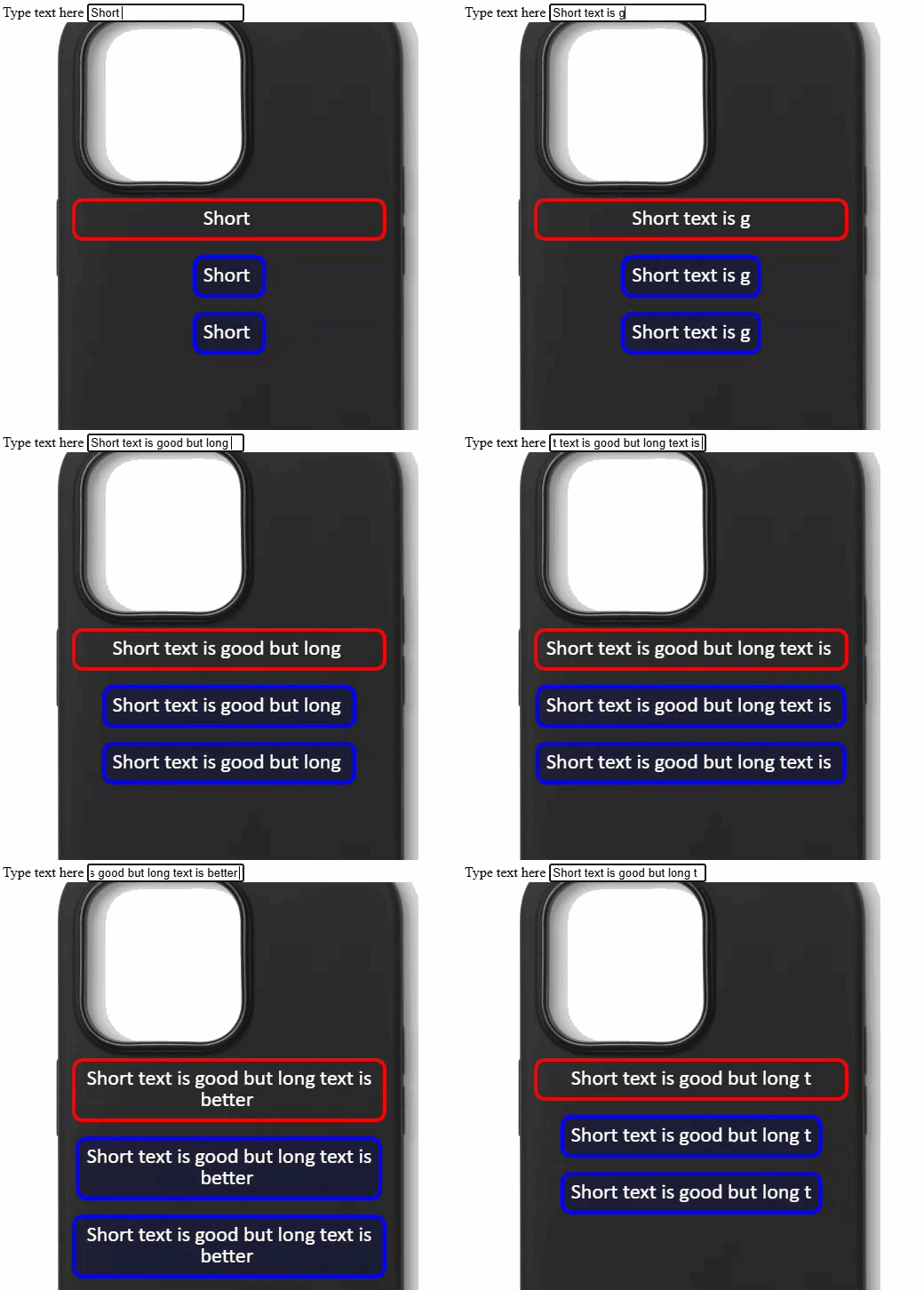
As per the introduction, the requirement is to have a border around some text. The border needs to be tight against the text. Take a look at the image above - the red bordered text is what we get in a standard Konva.Text case. Meanwhile the blue bordered text boxes show the two solutions.
Text without borders?
The Konva.Text does not have a border. It does have stroke and strokeWidth but for Konva.Text these attributes only affect the stroke of the text characters. To get a border we need to position a Konva.Rect under the text and match their sizes.
Tightening up the box
Depending on the use case I provide two solutions. Which you take is down to your preference. The solutions differ in their approach to handling the size and position of the text shape.
The Konva.Text lets us either set a specific width, or let Konva set the width to match the text content.
Solution #1, which is the more complex, uses a fixed text shape position and size. To calculate the border rect info it relies on using an undocumented Konva.Text.textArr attribute which holds a list of information for each line of text. Useful for this mission, it provides the line width. We can therefore find the maximum text line width and use this value as the width for the border rect. It's then just a matter of positioning the border rect so that it is center-aligned with the text box.
  // ----------------------------------------------------------------------
  /*
  * Solution #1: We find the max text size in the lines of the Konva.Text shape
  * and use that to make and position a rect so it is tight around the text.
  */

  // Set the text then iterate the lines list to find the max line width
  goodText1.text(textValue)
  let maxWidth = goodText1.textArr.reduce((max, line) => line.width > max ? line.width : max, 0 )

  // and add the text padding
  maxWidth += 2 * goodText1.padding()

  goodText1.setAttrs({
    text: textValue,
    y: badText.y() + badText.height() + 20 // not part of the solution.
  })

  // position the rect to give a border for the text
  goodRect1.setAttrs({
    x: goodText1.x() + ((goodText1.width() - maxWidth)/2), // standard center-in-space calculation
    y: goodText1.y(),
    width: maxWidth,
    height: goodText1.height()
  })
Solution #2 lets Konva decide on the width of the text box - at least up to the maximum allowed in the use-case. When the text and width are set, all we have to do is center-align the text box in the available width, then match the text box position and size for the border rect.
  // ----------------------------------------------------------------------
  /*
  * Solution #2: text is set with width=null so that Konva makes the
  * text shape width match the text content.
  */

  // set the width of the text box to auto so that we get a good measurement
  goodText2.width(null)

  // set the text individually so that the width is known
  goodText2.text(textValue)

  // If the width exceeds the allowed space we set a value, otherwise set to null for auto-width
  goodText2.width(goodText2.width() < maxTextWidth ? null : maxTextWidth )

  // set the x pos to center horizontally in the phone space
  goodText2.setAttrs({
    x: textLeft + (maxTextWidth -  goodText2.width())/2, // standard center-in-space calculation
    y: goodText1.y() + goodText1.height() + 20  // not part of the solution.
  })

  // position the rect to give a border for the text
  goodRect2.setAttrs({
    x: goodText2.x(),
    y: goodText2.y(),
    width: goodText2.width(),
    height: goodText2.height()
  })
I prefer solution #2 because it is more straightforward.
Summary
We've seen the standard behaviour of the Konva.Text shape. We've seen two ways to measure the size of the text and to get a pleasing border via a positioned rect. Solution #1 uses the text.textArr which is a useful technique for measuring the longest line of a multiline text box.
Thanks for reading.
VW. Mar 2025