I went down a rabbit hole trying to write an article explaining math-based mouse pointer hit testing compared to Konva's built-in pixel-based approach. I thought a math-based approach could be better. In the end I had to agree that Konva has it covered and there's no optimisation to be done. Here's the explanation...
The mission
I have a picture, composed of 19950 Konva hexagon shapes on the stage and I want a mouseover effect that changes the color of the hexagon under the mouse. I want no lag.
The demo
TLDR! See the code at CodePen here.
The demo takes an image - Mr Yoda looking his finest - and pixelates it using the Konva.Filters.Pixelatpixels image filter with the pixel size set at 12px. It then samples the color at the center of each pixel, and creates a Konva.RegularPolygon - in fact a hexagon - at that point using the sampled color. The color sampling was just for fun - I needed a ton of shapes and this was a fun way of getting them set up.
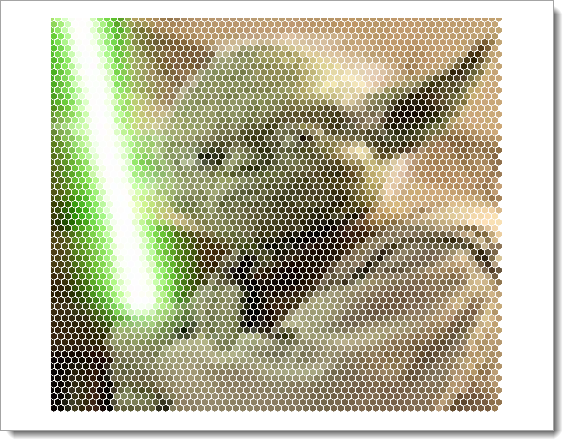
So that's 19950 Konva objects, drawn using the tips for performance from here.
There are two layers - the one with Yoda shown as hexagons which I'll call the Yoda layer, and another layer above that which houses only the red hexagon which is drawn over the Yoda hexagon that we register a hit on as we move the mouse.
The Yoda layer is cached. In case you are not aware, this means that after the first draw of the layer, Konva will take a snapshot of the layer and draw that instead of all the individual shapes - a decent performance gain if the layer is mostly static content as in my case.
I also switch off shadows, perfect drawing and turn off listening for all of the hexagons. In other words it's about the best performance I could get.
Finally, I use throttling on the mouse move event to stop it firing too fast.
How does Konva handle hit testing a point
Konva shape-at-point hit testing works like this.
- as you assemble your shapes on the visible stage, Konva prepares an off-screen hit canvas. This non-visible canvas contains copies of your layers and shapes, with the difference that the shapes are all assigned a single unique _signature_ color then filled & stroked with it, and with the opacity set to 1.
- When you ask about shapes at a point, Konva gets the canvas pixel array for that point on the hit canvas.
- If there is any color in the pixel info, it knows there is a hit on something. It uses the color to look up the shape from a list it manages against the signature colors.
The only potentially concerning cost here is the grabbing of the canvas pixel data. However, because we know the precise point we need to check, Konva only grabs the color data for that single point. It does NOT grab the pixels of the entire off-screen canvas - it ONLY gets the color data for that single point.
Additionally, under the hood, Konva's approach handles the chance that we hit an antialiased pixel very efficiently too, by running a spiral check around the target point if it hits a pixel with alpha below 255.
This approach is very efficient. It also covers cases where a shape has a transformation (offset, scale, rotation, skew) applied, and cases where a shape has transparent areas such as a star or an image with transparency at the edges.
Is a math-based approach faster or better
Quick answer - no.
The longer answer reaches the same conclusion but you're probably interested so here it is.
Math-based hit testing for a point on shapes works by making some kind of index of the boxes occupied by the shapes. For example, split the drawing area into a tree of ever-smaller box areas and relate each shape to the containing box at the most detailed level. Now, given a point, you can do a search along the tree finding the box that contains the point at each level. If your tree is 5 levels deep then after five checks you get to the list of shapes in that grid. Work through those and you find the shape or shapes for which the bounding box is that area. This gives you a suspect list of shapes to check.
If, and only it, the shapes are unrotated rectangles, you will find the answer at this point.
However, if the shapes are not rectangular, or have concave areas, or are circular, or are a path, then you have come to the end of what simple math can do and you must now turn to complex and expensive processes to determine if any part of the shape is actually under the exact point of interest.
Comparing the approaches
In the Konva approach Konva has to maintain a shadow hit-canvas, and a lookup object to do the indexing of shapes by the solid fill color it uses for each shape drawn on the hit canvas. At hit-testing time is has to get the pixel data for the point under the mouse pointer on the hit canvas, then look up via the color into the shape index. Job done.
In the math approach we have to create a grid tree of the drawn area, and register the location of each shape in the final level of the grid. Then at hit-testing time we have to find the lowest grid level box that contains the mouse point which gives us our candidates that may be hit. We then have to run whatever code we need to confirm which is under the point.
Konva's approach has the execution and memory overhead of setting up the hit canvas, then the cost of getting the pixel data for one pixel position. The cost of the look up of the color against the shape index is trivial.
The math approach has the trivial overhead of setting up the grid tree and scanning it to identify the candidate shapes, but then the cost of whatever code is executed to carry out the final hit test on those candidate shapes.
Konva's approach is pixel-accurate, including handling anti-aliasing, and shadows.
The math approach is inaccurate when the shape is non-geometric, and even for geometric shapes the math-based code for 'is this point in this shape' varies per shape giving us more code to manage. And it can't hit test shadows.
Could a combination of approaches be better?
We could combine the approaches, using the math-based approach to get that candidate list of shapes in the vicinity of the pointer and then employ Konva's hit testing to confirm the hits.
However, since the Konva approach is so simple, fast and accurate, there is no benefit in adding the complexity of even the gridding part of the math-based process.
And it's no surprise that Konva's pointer events code uses this approach to give very good performance as we wave the mouse over the 19950 possible shapes!
Summary
We've seen that Konva uses a pixel-based color check of a single pixel to do point-based hit testing. We've discussed the potential for a faster math-based approach.
My conclusion is that there is no need to be concerned about relying on Konva's approach. It is simple to use, fast, and very accurate. Compared to this, any math-based approach will be inaccurate and complex and likely no faster than Konva except for the tight set of cases of non-transformed rectangular shapes.
Thanks for reading
VW May 2024
Photo by Mihai Lazăr on Unsplash