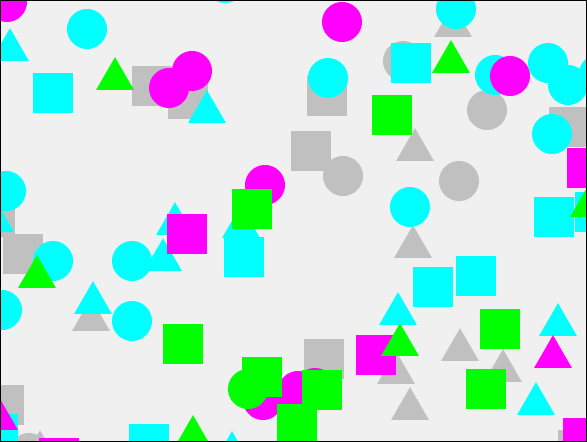
I was working on a minimap component and needed to generate a couple of layers with relatively random shapes - this is what I did.
TLDR: see the sample code here on CodePen, which includes the class and demo.
The mission
A minimap is a miniature viewer for the canvas that lets the user get a sense of the area they are viewing and its relationship to the full canvas. It's handy when you have a large canvas with some out of view or when you are deeply zoomed into the canvas. I wanted my minimap class to be independent of the specific app I was working on so decided to generate some random objects on a couple of layers to give me something representative and simple to work with.
This is a refactoring of some code I made in the blog post explaining that Konva does not have css-type selectors - what are the alternatives? In that post I was creating a load of objects to demo selectors. Since I've needed this twice now I thought I would bundle it up into a class for the next time I need it!
I needed to be able to specify the stage, how many layers I want, the colors for the shapes on each layer, and the target area I want the shapes to appear in.
The code
There's nothing much very special in the code below. The class receives the input params to its constructor then sets up the color layers and shapes.
/** Class to fill layers with random shapes.
 *
 * params
 *
 * Example:
 *   const configObj = {
 *    stage: stage,  target:  { x: -100, y: -100, width: stage.width() + 200, height: stage.height() + 200 }, colors: ['red', 'blue'], withRect: true
 *      }
 *  const randomShapes = new RandomShapes(configObj);
 */

export class RandomShapes {

    target = {  // default for the target area we intend to use to draw shapes
        x: 50,
        y: 50,
        width: 500,
        height: 300
    };

    r0 = null; // baseline rect, circle and triangle, add more as needed.
    c0 = null;
    p0 = null;

    stage = null;  // will be passed in
    layers = [];  // will be created per color
    colors = [];  // array of color names  - we will add a layer per color
    shapes = [];  // array of shapes we created
    shapesMax = 50;  // upper limit of shapes to be created for each color layer + shape type.
    withRect = false;  // do we want a rect border around the shapes on each layer ?

    /**
     *
     * @param {object} opts - config object
     * @param {Konva.Stage} opts.stage - The stage on which the layers and shapes are added.
     * @param {object} opts.target - The simple JS object describing the target rect into which the shapes are drawn. {x, y, width, height}
     * @param {string[]} opts.colors - List of color names for which each will produce a layer of shapes filled with this color.
     * @param {boolean} opts.withRect - Flag indicating whether each color layer should have a rect border around the outside of the layers shapes.
     */
    constructor(opts) {
        Object.preventExtensions(this);
        const that = this; // alias this for use in callbacks.

        this.stage = opts.stage;
        this.layers = {};
        this.withRect = opts.withRect;
        this.target = Object.assign(this.target, opts.target);
        this.colors = opts.colors;

        // make some shapes for the layer - we use these as base shapes to clone.
        // Note that shapes are not draggabe but layers are.
        this.r0 = new Konva.Rect({
            x: 0,
            y: 0,
            width: 40,
            height: 40,
            fill: "magenta",
            draggable: false
        });
        this.c0 = new Konva.Circle({
            x: this.stage.width() / 2,
            y: this.stage.height() / 2,
            radius: 20,
            fill: "blue",
            draggable: false
        });
        this.p0 = new Konva.RegularPolygon({
            x: 200,
            y: 100,
            sides: 3,
            radius: 22,
            fill: 'gold',
            lineJoin: 'bevel',
            draggable: false
        });


        // make a list of colors to use for the shapes
        this.colors = opts.colors;


        for (const color of this.colors){
            this.layers[color] = new Konva.Layer({draggable: true});
            this.stage.add(this.layers[color]);
        }

        // a list of shapes to work through
        this.shapes = [this.r0, this.c0, this.p0];

        this.reset();
    }

    // get color names from the list randomly
    randomColor() {
        return this.colors[Math.round((this.colors.length - 1) * Math.random())];
    }

    reset() {

        let shapeIdx = 0;

        // loop per shape type shapeMax times, making a shape with random position and color.
        for (let j = 0; j < this.shapes.length; j++) {
            for (let i = 0; i < this.shapesMax; i++) {
                const color = this.randomColor(),
                        s = this.shapes[j].clone({
                            x: this.target.x + Math.round(Math.random() * this.target.width),
                            y: this.target.y + Math.round(Math.random() * this.target.height),
                            fill: color
                        });
                        this.layers[color].add(s);
                shapeIdx++;
            }
        }

        // If the params require an enclosing rect around the layers then add.
        if (this.withRect){
            for (const color of this.colors){
                const theRect = this.layers[color].getClientRect();
                const r = new Konva.Rect({
                    stroke: color,
                    strokeWidth: 1,
                    listening: false
                })
                r.setAttrs(theRect);
                this.layers[color].add(r);
            }
        }
    }
}


// Code from here is a demo of using this class.
const stage = new Konva.Stage({
        container: 'container',
        width: window.innerWidth,
        height: window.innerHeight,
        draggable: true,
      }),

      layer = new Konva.Layer({
        draggable: false
      });

const configObj = {
    stage: stage,  target:  { x: -100, y: -100, width: stage.width() + 200, height: stage.height() + 200 }, colors: ['red', 'blue'], withRect: true
}
const randomShapes = new RandomShapes(configObj);
One word of warning - the class creates a new layer for each color name passed into it. Generally speaking, you want to limit the number of layers you have in your Konva diagram because each layer has some overhead - see the performance tips section in the Konva docs for details.
Summary
The class does what it says on the tin, giving us a quick way to fill a targeted area with shapes in different colors.
Thanks for reading.
VW Jan 2023